ESRT StrongMind
Evidence-based stress resilience training for healthcare professionals, used by the UCSF Center for Mindfulness in Surgery
About the Programme
What is Enhanced Stress Resilience Training?
Enhanced Stress Resilience Training (ESRT) is an evidence-based, mindfulness-based biopsychosocial programme designed to build stress resilience in healthcare professionals. Created by Dr Carter Lebares at the University of California, San Francisco (UCSF), ESRT has been developed and refined through clinical research with surgeons, medical residents, nurses, and other healthcare workers in high-pressure clinical environments.
ESRT StrongMind is the digital companion app that brings ESRT to iOS and Android. Built by BeWell IT on the BeWell Catalyst platform, it enables course instructors to deliver structured ESRT programmes digitally, with guided practices, progress tracking, and engagement analytics for research and programme evaluation.
Why ESRT
Designed for healthcare professionals
Evidence-based research from UCSF
Developed at the UCSF Center for Mindfulness in Surgery, ESRT is grounded in published clinical research demonstrating its effectiveness for healthcare worker wellbeing and performance.
Built for high-stress clinical environments
Unlike consumer mindfulness apps, ESRT addresses the specific stressors faced by surgeons, medical residents, and nurses with a programme tailored to clinical workflows and schedules.
Instructor-led structured programmes
Courses are delivered by certified instructors using structured curricula, not self-guided meditation libraries. The app supports both teacher and student modes with engagement tracking.
Research-grade data collection
The platform collects anonymised engagement data for programme evaluation and academic research, supporting the Lebares Resilience Lab and other research teams in evidence-based improvement of stress resilience interventions.
Get Started with ESRT StrongMind
Follow these simple steps to download the app, create your account, and access your course content or explore the free preview.
Quick Access Guide
Five steps to get started
Download the ESRT StrongMind App
Download the ESRT StrongMind app from your device's app store:


Sign Up or Log In
Open the ESRT StrongMind app and either create a new free account or log in with your existing credentials.
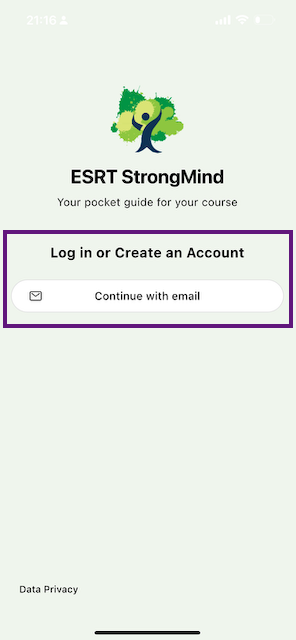
ESRT StrongMind login/signup screen
Register for a Course (New Users)
You have two options:
To try the preview: Select the "ESRT Preview Course" option at the top to explore key ESRT concepts and practices.
If you have a course key: Enter your specific course key in the input field below the preview option to access your assigned programme.
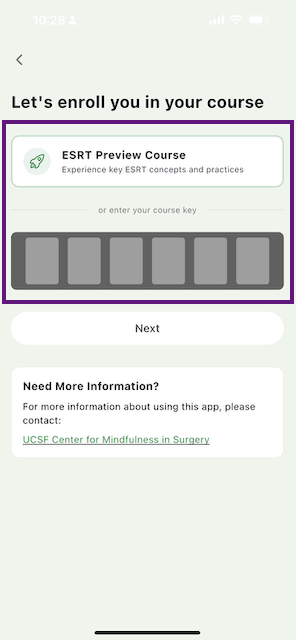
Course enrollment screen showing ESRT Preview Course option and course key entry
Course Options
The ESRT Preview Course appears prominently at the top of the enrollment screen. If you have a course key, you'll find the input field just below this option.
Next: After making your selection, proceed to Step 5 to start your experience.
Register for Another Course (Existing Users)
If you already have an account and want to add another course, go to the Account screen. Look for the "My Courses" section and tap on the "+ Add Course" button. Then enter your course key or select the "ESRT Preview Course" option.
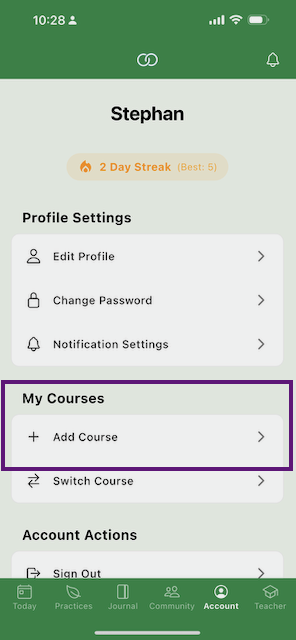
Account screen showing the "+ Add Course" option under "My Courses"
Start Your Preview or Course Experience
Once enrolled, you'll have access to your course content, including an "Introduction to ESRT" module with sample activities (for preview users). You can switch between Teacher Mode and Student Mode to explore different perspectives of the programme.
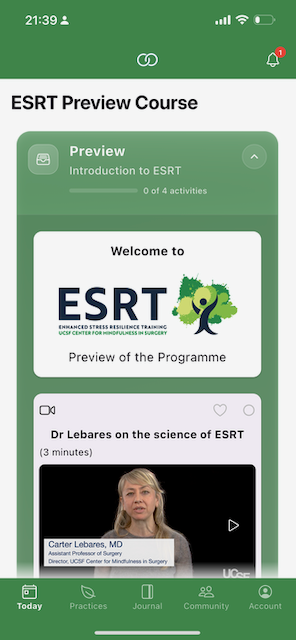
ESRT course interface showing available content and Teacher/Student mode options
Common Questions
Frequently asked questions
What is Enhanced Stress Resilience Training (ESRT)?
Enhanced Stress Resilience Training (ESRT) is an evidence-based, mindfulness-based biopsychosocial programme created by Dr Carter Lebares at the University of California, San Francisco (UCSF). It is designed to build stress resilience in healthcare professionals working in high-pressure clinical environments, including surgeons, medical residents, and nurses. The programme draws on published clinical research from the UCSF Center for Mindfulness in Surgery.
Who is ESRT StrongMind designed for?
ESRT StrongMind is designed for healthcare professionals, particularly those in high-stress clinical environments such as surgeons, medical residents, and nurses. Course instructors and programme facilitators also use the app to deliver structured ESRT programmes to their participants, with tools for tracking engagement and progress.
Is the ESRT StrongMind app free?
The app is free to download on iOS and Android. A free ESRT Preview Course is available for anyone to explore core ESRT concepts and practices. Full programme access requires a course key, which is provided by your course instructor or institution.
What is the connection between ESRT and UCSF?
ESRT was created by Dr Carter Lebares at the UCSF Center for Mindfulness in Surgery. The programme has been developed and refined through clinical research at UCSF and UCLA, with published evidence supporting its effectiveness for healthcare worker wellbeing and stress resilience. The Lebares Resilience Lab continues to lead ESRT research.
How is ESRT different from consumer mindfulness apps?
Unlike consumer meditation apps like Calm or Headspace, ESRT StrongMind delivers structured, evidence-based programmes designed specifically for healthcare professionals. Courses are led by certified instructors, content is grounded in clinical research from UCSF, and the app includes engagement analytics and progress tracking that support both programme delivery and academic research.
What features does ESRT StrongMind include?
The app includes guided mindfulness practices, structured course content with modules and activities, progress tracking, teacher and student modes for different perspectives, and community features. Course instructors can monitor participant engagement, and the platform supports anonymised data collection for programme evaluation and research.
What You'll Experience
The ESRT StrongMind app provides access to course content, guided practices, and community features. Preview users can explore introductory ESRT concepts and sample mindfulness practices, while enrolled participants get full access to their assigned programme materials.
Last updated: 9 February 2026